Finds faces for you
In photos and videos alike. For video, we check every single frame so nobody sneaks through.
Post the memory. Keep their face to yourself.
Your photos and videos never leave your phone unless you choose to share them. No account, no uploads.
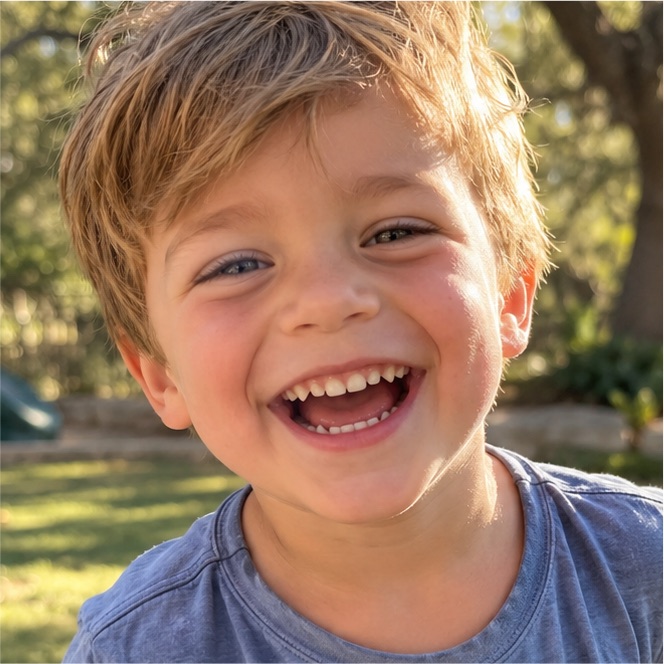
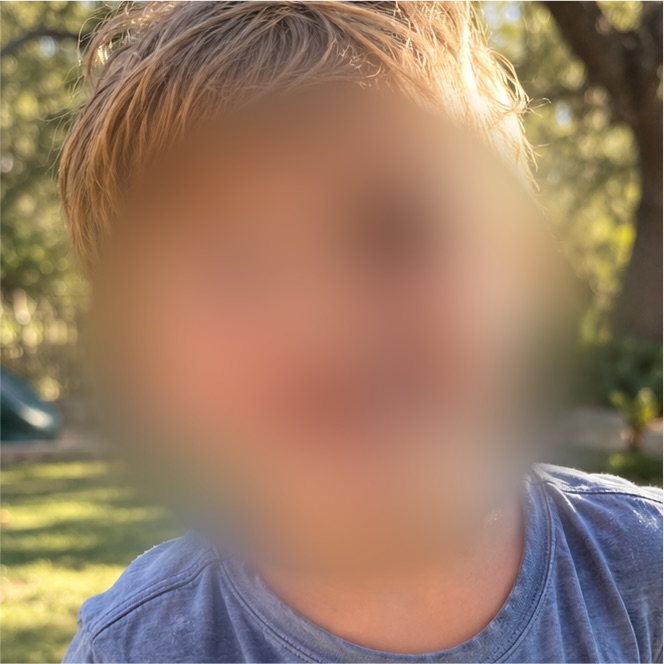
No editing skills needed. If you can pick a photo, you've got this.
Choose anything from your Photos. We scan every frame and find the faces for you.
Everyone starts hidden, so it's safe by default. Tap a face to show it. Missed someone? Add a blur by hand.
Save a new copy to Photos, or tap Share and send it straight to the group chat. Your original stays put.
The fiddly part (finding every face, in every frame) is our job. Yours is the fun part.
In photos and videos alike. For video, we check every single frame so nobody sneaks through.
The cover follows each face as kids run, spin, and turn sideways. When a face turns away, we use their body position to keep their head covered.
Pick the look you like. One style covers every hidden face, and what you preview is exactly what you save.
Spot a face we missed? Pause and tap it. In a video, the blur follows that spot for a few seconds before and after. In a photo, drag to size it.
Before anything is saved, you see every face we found as a tile and decide. Kids don't sit still, so you might see the same face from a few angles.
Once it's saved, tap Share to send the covered copy to Messages, Instagram, or wherever your people are.
The whole point is keeping your kids offline, so the app doesn't get to peek either.
Finding faces, covering them, and saving the copy all run on the phone in your hand, using Apple's built-in tools.
Your photos and videos never leave your phone unless you choose to share them. The only thing the app ever talks to is Apple's App Store, to handle the one-time purchase, and that conversation never includes your photos. Hiding faces works in airplane mode.
No sign-up, no analytics, no ads, no tracking of any kind. We don't know who you are, and we like it that way.
Saved photos and videos have their location removed. Photos lose their camera and date info too. (Videos still keep camera model and date for now; see the FAQ.)
We redraw the pixels themselves, so there's no hidden layer and no "undo" for anyone you send it to.
We always save a brand-new copy. The photo or video you picked stays exactly as it was.
Photos access is limited to adding new items. The app can't browse, change, or delete your library; it only sees the one photo or video you pick. Read the full privacy policy.
Share the first bike ride with family and friends, without putting your kid's face on the internet before they're old enough to decide.
Your kid is front and center, but so are six other people's kids. Show yours, hide everyone else's, and skip the awkward "is it OK if I post this?" texts.
Share what the class got up to with families, while keeping faces private for kids whose parents haven't said yes to photos.
Keep telling the family story you share online while your kids keep their secret identity, even in video.
No. Everything (finding faces, covering them, saving the new copy) happens on your iPhone. Your photos and videos never leave your phone unless you choose to share them. The app's only connection is to Apple's App Store, for the free trial and the one-time purchase; it has no account and no analytics or tracking. Your photos only go somewhere if you share them yourself.
Not from the copy we save. The cover is drawn into the pixels themselves: there's no layer to remove and no copy of the face tucked inside the file. The blur is heavy on purpose. If you want no face pixels left under the cover at all, choose Solid or Emoji, which completely replace the face.
Your original is still in your Photos, unblurred, so keep that one to yourself.
It can happen, especially with tiny faces in the background, so you get the final say. Before you save, you see every face we found. In the preview, tap Add blur and point at anyone we missed. Turn on Show what's hidden to see exactly where the covers are. We lean toward covering a bit too much rather than too little.
Never. We only read the one you pick and save a brand-new covered copy next to it in Photos. The app only has permission to add to your library, not to edit or delete anything in it.
Yes, and photos too. For video we scan every frame, follow each face as it moves, and keep the sound. Longer clips take longer to scan, and you'll see a progress bar while it works.
That's what we built it for. Face detection has a harder time with side profiles and fast motion, so we back it up: covers are drawn bigger than the face, they keep going for a moment if a face is briefly lost, and when someone turns away we use their body position to keep their head covered. It's good, not perfect. Give the preview a quick look before you post, and add a blur by hand if anything peeks through.
Saved photos have their location, camera details, and date taken removed. Saved videos have their location removed, but currently still carry the camera model and recording date. We're working on that. After each save, the app tells you exactly what it removed from that file, and never claims more than it did.
The download is free, and so is everything up to the first save: pick, scan, cover, preview. Saving or sharing starts a free week, and after that it's a one-time $1.99 to unlock for good. No subscription, no ads, no watermark, and nothing about you or your photos is ever sold or collected.
It's an iPhone app built for recent versions of iOS. We'll publish the exact minimum iOS version and supported models when it lands on the App Store. Beta testers will see it in TestFlight before installing.
It's in testing now. Get on the TestFlight list and we'll send you an invite as spots open up.
Help us test it on your own camera roll before it hits the App Store.
This opens your email app with a note ready to send. Nothing is stored on this site. Or email michhaws@gmail.com.